

IS AI ARTWORK READY TO PRINT?
Most of the time, no.
AI has made basic artwork easier to create. But what looks good on screen and what will print the way you want it to aren’t always the same thing. If you're not sure whether your ChatGPT, Canva or AI-generated artwork is ready to print, ask us before you send your order.
Glide Print can tell you what needs changing and why and help you get the file ready for production.
Our latest free guide unpacks what you need to know and why your AI artwork may not be ready to print just yet.
OpenAI describes its image-generating functions as able to create “production-ready assets” but that’s not the same thing as “print-ready artwork”.
If you're creating artwork to send to a commercial printer, there are several technical aspects that still need to be correct so your print products look perfect.
What does “print-ready” mean?
Print-ready artwork has been correctly prepared for the particular printing process and finished size of the end product. Here are the most common things that need to be done right. For everything else, ask your local print expert.
* Requirements can vary between print products.
1. Correct final dimensions
The page size of the artwork must be the same size as the finished (printed) product - plus ‘bleed’.
If you’re making a DL flyer, for example, then the finished product will be 99mm X 210mm, but your artwork file needs to be 102mm x 213mm to allow for 3mm bleed.
2. Correct crop/trim, fold or score marks where required
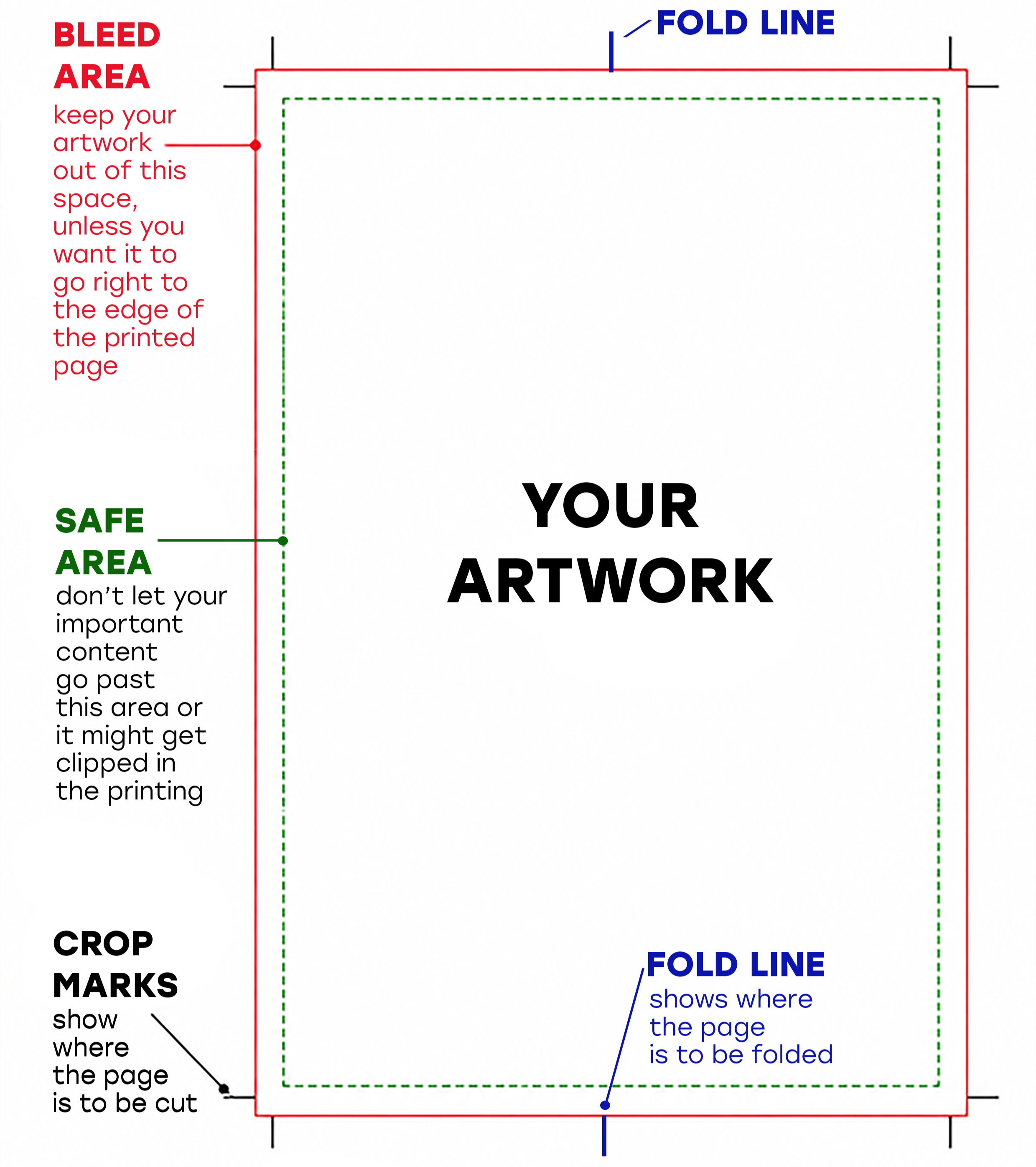
Crop (also called trim) marks are the lines printed on the corners of your artwork that indicate where to trim the paper.
Other lines can also show where you want the product scored or folded.
These tell the production team where you want the print machine to cut your page edges or fold the finished product.
If you’re using InDesign, they can be added at the exporting step.
These marks don’t appear in the final product.
3. Bleed beyond the trimmed edge
The ‘bleed’ area is an unmarked margin outside where the finished page will be cut, to allow for any slight shifts during the printing process.
Glide Print’s standard bleed is 3mm.
This area is in addition to the actual printed page size and is typically set at the initial artwork setup, before adding any images or text.
If you want an image to run all the way to the edge of the final printed piece, your artwork needs to extend beyond the crop marks line into the bleed area.
An AI-generated image won’t include bleed, safe area or crop marks in the artwork it creates. You need to add that yourself.
4. Safe margins for important text and graphics
Also called ‘safe area’ this is the unmarked margin that goes inside the crop/trim line. It’s an extra space to protect important parts of your artwork that are on the edges and could get clipped if there’s any tiny movement in the paper while it’s being printed.
5. Sufficient image resolution
Just because it looks fine on your computer screen doesn’t always mean it will print well. That good-looking image can become soft or pixelated when enlarged for a poster, banner or other large-format application if it’s been created at too low a resolution (low res).
This is particularly important with AI-generated artwork because the native image dimensions and resolution may not be correct for the intended final size of the product.
Image resolution is measured in DPI (dots per inch). Print images need to be 300dpi.
Images saved directly from a webpage, for example, are only about 75dpi. A good way to check if your image has enough dpi is to increase it to 300-400% and see if it distorts.
An image saved as a JPG will be compressed a little more every time it is saved. PNG and TIFF are more reliable and work better for quality images.
See our free guide Creating Quality Images for more information.
6. Appropriate colour mode
Screens use RGB colour mode, commercial printing generally uses CMYK. The two systems don't reproduce every colour in exactly the same way, so some bright or highly saturated colours on your screen can change when converted for print.
CMYK is best for most print products. If you’re not sure what’s right for your particular job, check with us first.
Also useful to know is that different types of paper and thickness, plastic, vinyl, etc. can alter the final colouring. If in doubt, get in touch with us.
See What is Colour Matching for more information.
7. Correct PDF specifications
Supply your PDFs as single-page scrolling, not as spreads or separate files for each page.
Sometime professional printers need variations on this requirement so check first if you’re not sure. With books, for example, they often want a separate file for the cover.
8. Embedded fonts
If you’ve used a font that’s not widely used and available, the printer may not have it in their system and may need to substitute it for another font.
To avoid this, supply the font files when you send your print-ready artwork.
For final artwork, Glide Print recommend:
A 3mm bleed
Images in 300dpi
All crop/trim marks, folds and scores added and outside the print area so they do not print. They can also be included as a “spot colour” overlay.
All colours in CMYK
All fonts embedded
A high-resolution PDF created in:
Adobe InDesign for stationery, brochures and other documents.
Adobe Illustrator for vector graphics exclusively (images that are digitally created, not photographed – such as logos), exported as an .eps file.
Adobe Photoshop for photographs exclusively, exported as a 300dpi .jpg, .png, or .tiff file.
Microsoft Word for text documents.
Also see
How we can help
The best experience of print artwork will see you uploading a file that meets these requirements without you getting a call for corrections.
The more complex the product the more likely you’ll need professional design. For a simple flyer, there’s not as much to check as something like a complex catalogue, annual report, presentation folder, packaging job or multi-page book.
If you’re not sure, ask us before you start creating your artwork.
See our free guide How To Check a File Is Print Ready for more details.
If you prefer to handball the job to a print specialist, ask us about our graphic design service. Our graphic designers are skilled in print specs so you’ll get a faster turnaround time.
GLIDE PRINT know print
and Are here to help.
DESIGN SERVICE

The visual impact of professional quality graphic design is crucial to the success of all your marketing products.
Our designers are fast, creative and professional. We can add to your existing products or create a beautiful design from your ideas.
Glide Print supply all design work from simple tasks like getting your artwork ready for print to creating complex documents such as annual reports and marketing packages. We work closely with our clients to make sure your branding is consistent and the print quality is excellent across all your products.
All of our designers are based in Australia, we don’t outsource our work overseas. You receive personal attention from someone you can talk to and meet. It’s all part of Glide Print’s outstanding service to you.
Like all our products, we supply our design services at Glide Print’s competitive prices.
All our knowledge and skill come at no extra cost to you so you know
you're getting the best quality for your budget and the process will be an easy one for you.
We're here to help.
If you'd like to know the best way to create your print products for the best price
call us on (08) 9221 7514, email us or request a quote.